Catalog
If you are using the Linux one-click installation package, you can follow the steps below to update.
1. Upgrade steps
- Download our new source package (zip format). (Note that it is not the integrated runtime environment of .tar.gz. If you download this, the data will be overwritten)
- After decompression, get the zentaopms folder, copy all the files under zentaopms/ to /opt/zbox/app/zentao/, and overwrite the files with the same name:
sudo cp -rf zentaopms/* /opt/zbox/app/zentao/- Then visit http:/ip address/zentao/upgrade.php and follow the instructions on the page to upgrade.
- Do not unzip it to /opt/zbox/app/zentao/zentao. Do not remove the original program, and unzip the new version. You need to overwrite it!
2. Misc
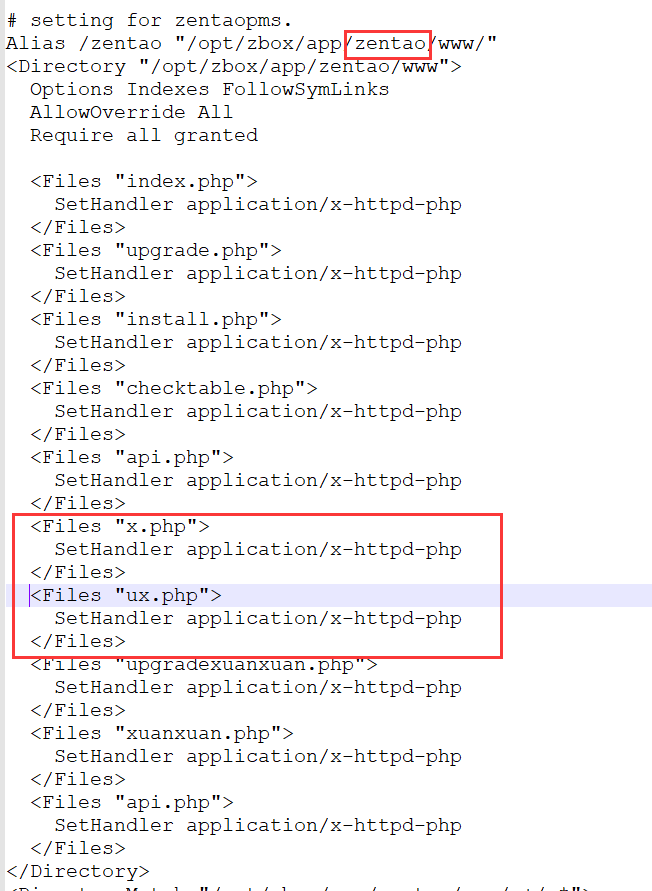
If you want to use the ZenTao client after the upgrade of the ZenTao one-click installation package before ZenTao 11.0, you need to check whether the following lines of code exist in the /opt/zbox/etc/apache/httpd.conf file (if you already have these No need to operate this step, if you do not add these lines of code in httpd.conf). Then restart the ZenTao service (sudo /opt/zbox/zbox restart).
Copy the following code and add it to the red box as shown in the screenshot.
 <Files "x.php">
    SetHandler application/x-httpd-php
  </Files>
<Files "ux.php">
    SetHandler application/x-httpd-php
  </Files>
The file would be like