Webhook has been added in ZenTao 9.6+. You can send data in JSON to third-party hook URL. Let's see how to configure it.
Log in ZenTao as Super Admin. Go to Admin->API->WebHook, and click "New Hook" to add a new webhook. Refer to the screenshot below.
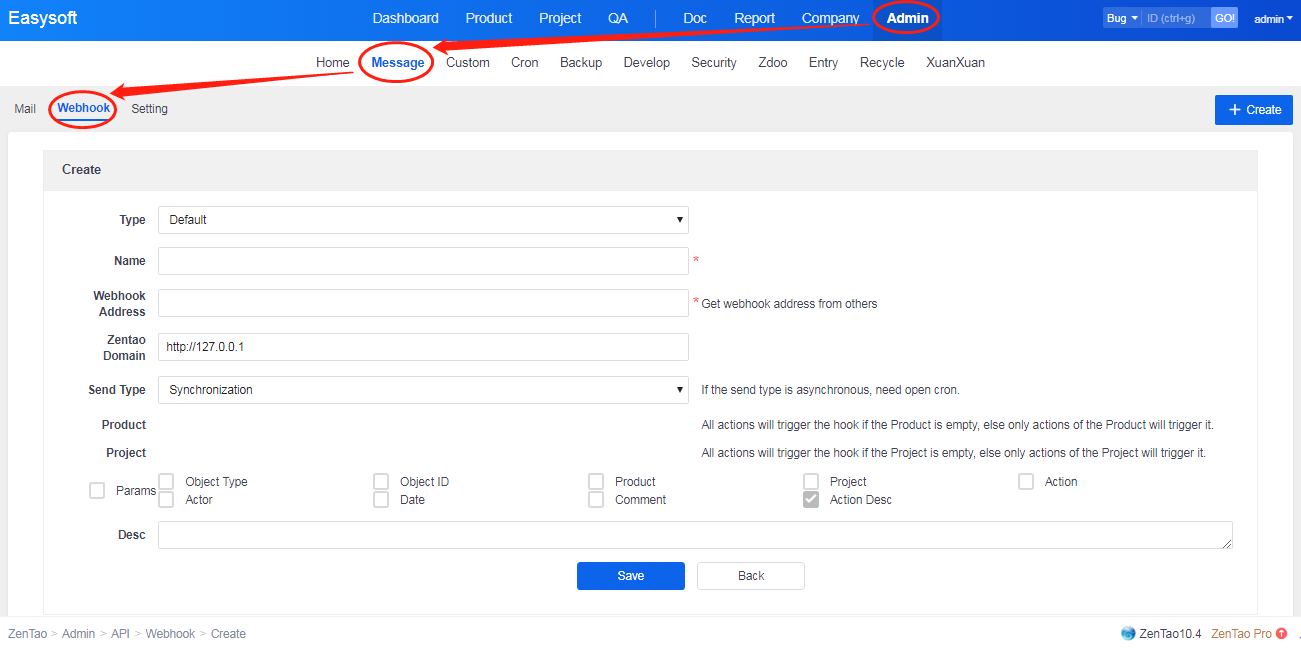
- Name and URL are required fields and others optional. URL is obtained from the third party.
- Send Type is Sync, which means ZenTao will send messages to hook URL if any actions in ZenTao. If Async, you have to use the cron to send it.
- Linked Product and Linked Project. If its value is NULL, any actions in ZenTao will be sent to the URL. If not, only actions on chosen product/project will be sent.
- A parameter is the attribute of the data sent, including
{
    "objectType": "",  //object type; it can be null
    "objectID": "",    //object ID; it can be null
    "product": "",     //linked product ID; it can be null
    "project": "",     //linked project ID; it can be null
    "action": "",      //actions; it can be null
    "actor": "",       //actor; it can be null
    "date": "",        //action date; it can be null
    "comment": "",     //comment; it can be null
    "text": ""         //action content; it is required field and includes the URL of the object
}
An action is any kind of actions that will trigger ZenTao to send messages to hook URL. If it is null, no messages will be sent. If you know something about how to develop add-on functions based on ZenTao,you can change
zentao/module/webhook/config.php to edit this field.