
Configuration & content
How do I disable the Story review process?
Short answer
This feature is available in Sanplex Free, Standard and Premium. You can disable the story review process from the Product feature settings. After it is disabled, stories continue through the remaining configured workflow without the review step.
Availability: Available in Free, Standard and Premium
In this article
Before you change the setting
Confirm that the team has an alternative way to review stories or accepts that stories will move forward without a dedicated review checkpoint.
Disable story review
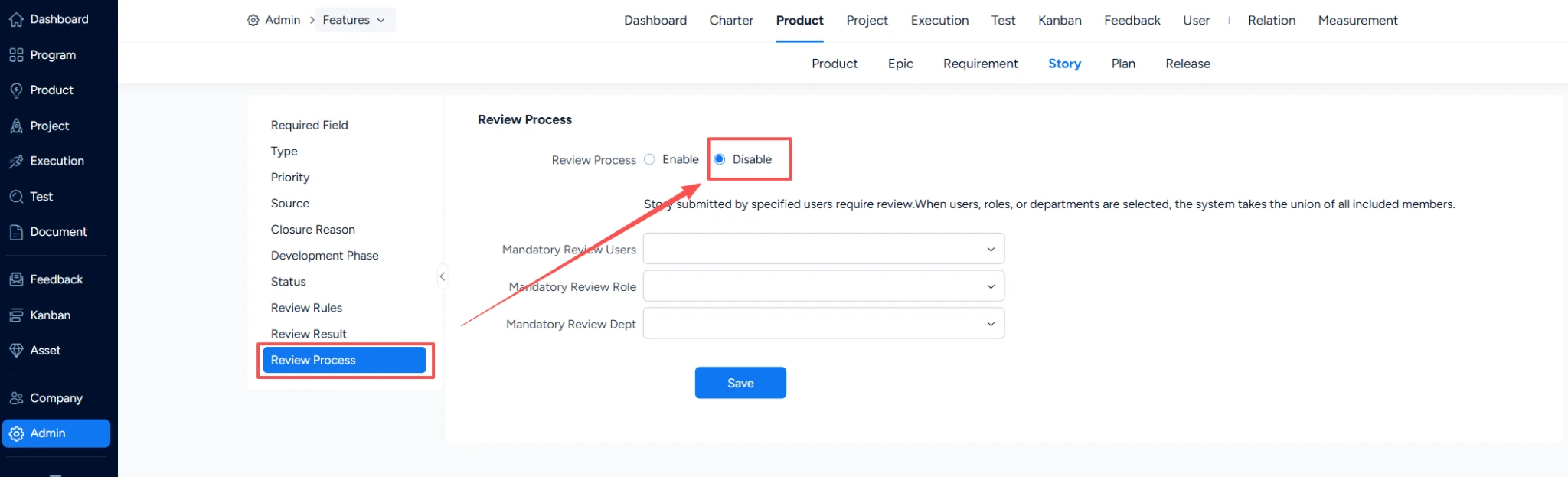
- Go to Admin > Features > Product > Story > Review Process.
- Disable the review process.
- Click Save.
- Create or move a test story through the workflow to confirm that the review step is no longer required.
Note: This setting changes the workflow behavior. Coordinate the change with product owners and reviewers so the team understands how stories should be approved from that point onward.


