Free Risk Register Template for Project Managers
September 7, 2026PUBLISHED INAgile
 ali
ali 2026-09-07 14:46:00
 0
0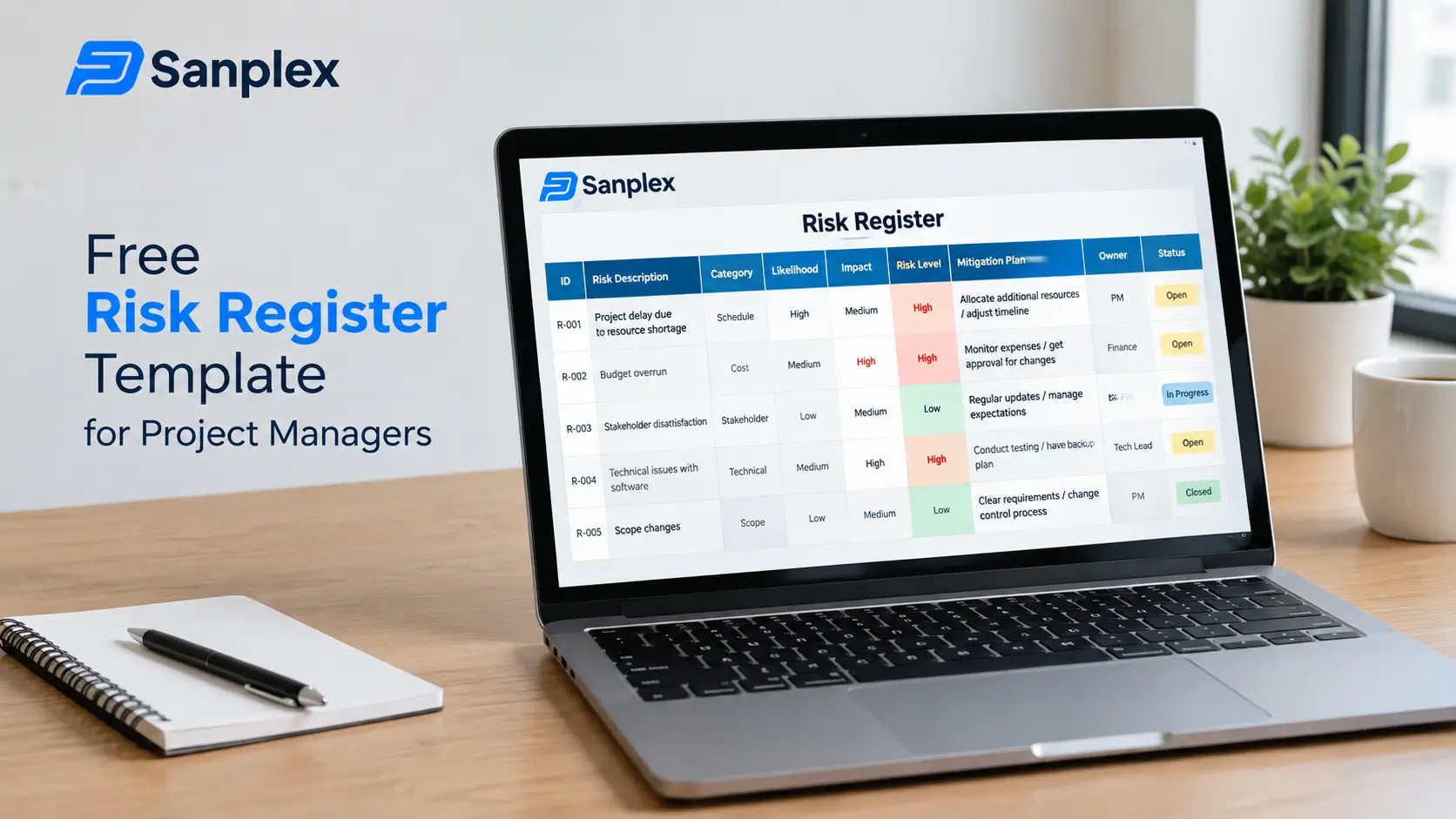
A risk register that just lists things that could go wrong isn't actually managing risk, it's documenting anxiety. A useful one forces two decisions for every entry: how likely is this, and what do we actually do about it if it happens. Here's a template built around those decisions, not just a list.
The Core Template
|
Risk |
Description |
Likelihood |
Impact |
|
Key vendor delay |
Primary supplier misses agreed delivery date for critical component. |
Medium |
High |
|
Scope creep |
Stakeholders request additions beyond agreed scope without formal change control. |
High |
Medium |
|
Key person dependency |
Critical technical knowledge held by one team member with no backup. |
Medium |
High |
Beyond likelihood and impact, each row should also capture an owner (who's watching this specific risk), a mitigation plan (what we're doing now to reduce the chance or impact), and a contingency plan (what we do if it happens anyway). Skipping the owner column is the most common shortcut, and it's the one that matters most, a risk with no owner tends to get discovered only after it's already become a problem.
Likelihood and Impact Need Real Definitions
"Medium" means something different to everyone unless you define it. Set explicit criteria upfront, for example, High likelihood might mean "more than 50% chance within this project's timeline," while High impact might mean "would delay the project by more than two weeks or exceed budget by more than 10%." Without shared definitions, the register becomes a reflection of whoever filled it in that day rather than a consistent tool.
Reviewing the Register Is the Part Most Teams Skip
A risk register filled out once at project kickoff and never revisited is close to useless by week six. Risks change, some resolve, new ones emerge, likelihood shifts as the project progresses. Build in a recurring review, even five minutes at the start of a regular status meeting, rather than treating the register as a one-time kickoff exercise that gets filed away.
Keeping Risks Connected to the Work They Affect
A risk register living in a separate spreadsheet, disconnected from actual task and milestone tracking, tends to drift out of relevance, a risk that materializes doesn't automatically show up anywhere near the tasks it affects. Sanplex's project and execution tracking keeps risk-related documentation closer to the actual work, so a realized risk connects to the specific tasks and milestones it impacts rather than existing as an isolated record nobody cross-references.
Questions People Actually Ask
How many risks should a typical project register have?
Enough to cover genuine uncertainties, usually 10-25 for a mid-size project. A register with 100+ entries often means minor concerns are cluttering the space meant for real risks.
Who should own the risk register?
Typically the project manager maintains it, though individual risk owners (assigned per row) are responsible for monitoring and acting on their specific risks.
Should resolved risks be deleted from the register?
Better to mark them as closed and keep a record, that history is useful for future projects facing similar risks.
How is a risk register different from an issue log?
A risk register tracks things that might happen. An issue log tracks things that have already happened. A realized risk typically graduates from one to the other.
How often should the register be reviewed?
At minimum, at every major project milestone. Higher-risk projects benefit from a brief review at every regular status meeting.
Want risk tracking connected to your actual project work?
Visit Sanplex or book a demo to see how it works.