Catalog
Note: Starting from ZenTao 11.7, the editor and translation functions of the secondary development have been taken out as plug-ins because of security considerations.
Please feel free to download at ZenTao website - Product - Marketplace.
Download link: https://www.zentao.pm/extension-viewExt-51.html
Starting from ZenTao 11.6, Admin - Develop - Editor and Admin - Translation function can be only accessed under http://127.0.0.1: port number due to security concerns.
The following is a brief explanation of how to use the edit and translation functions of the secondary development.
1. For ZenTao one-click install packs
You can directly login to the machine where ZenTao is installed and use http://127.0.0.1: port number to access ZenTao, then you can go to Admin - Develop - Editor and Admin - Translation to access and use the feature normally.
2. For ZenTao server on Windows system
You can log in to the ZenTao server remotely, and use http://127.0.0.1: port number to access ZenTao on the browser on ZenTao server
This way you can go to Admin - Develop - Editor and Admin - Translation to access and use the feature normally.
3. For ZenTao server on Linux system
For ZenTao server on a Linux system, even if the address to access ZenTao is http://127.0.0.1:port number, it won't be judged as http://127.0.0.1:port number, it's because of port forwarding or bridging connections, and the functions of Admin - Develop - Editor and Admin - Translation cannot be used.
But it's possible to use the SSH tunnel of the editor to access ZenTao, so that you can access Admin - Develop - Editor and Admin - Translation via http://127.0.0.1:port number.
3.1 Connecting to the ZenTao server host
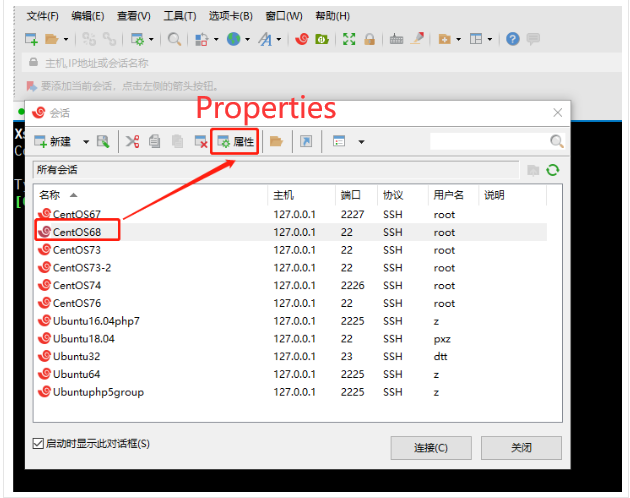
In the editor, open the ZenTao server host that needs to be connected, and click Properties.
3.2 Set up an SSH tunnel connection
For the target port, please fill in the port number used when accessing ZenTao. Click OK when the setting is done.
Then click the button Connect below.
Note: When setting up SSH tunnel connection, if the editor has already connected to this server before, please disconnect first before setting up.
3.3 Access to ZenTao
The previous address for accessing ZenTao is http://127.0.0.1:10271 , after setting up the SSH tunnel connection, ZenTao will be accessed at http://127.0.0.1:2222 . The port number should be changed to the listening port when setting up the SSH tunnel connection.
In this way, the functions of translation and second development editor can be used properly.