Catalog
Overview
Program management in Sanplex helps organizations coordinate related Projects, Products, and sub-programs within a structured management hierarchy. It supports unified planning, hierarchical management, permission control, and different views for managing work across multiple levels.
By organizing related work within Programs, teams can connect strategic planning with project execution, coordinate resources across different teams and product lines, and maintain a clearer view of complex initiatives.
Use Cases
- Support the execution of strategic goals: When an organization defines annual strategies or major initiatives, these goals may need to be broken down into multiple related Projects. A Program provides a structured way to manage these Projects and related Products together, helping teams maintain alignment during execution.
- Manage multiple product lines and Projects together: In organizations where different product lines, technical areas, or business teams work in parallel, Programs provide a unified structure for viewing and coordinating related work. Project View and Product View help managers understand relationships across different levels and improve cross-team coordination.
- Manage complex initiatives with multiple levels: Programs support multi-level structures through sub-programs, allowing complex initiatives to be divided into more manageable levels. This helps teams organize related Projects and coordinate work across different phases or organizational units.
- Support role-based access and visual collaboration: Programs support hierarchical permission control and visual management through views such as Program Kanban. This allows different roles to focus on the information relevant to their responsibilities while maintaining appropriate access boundaries.
View the Program List
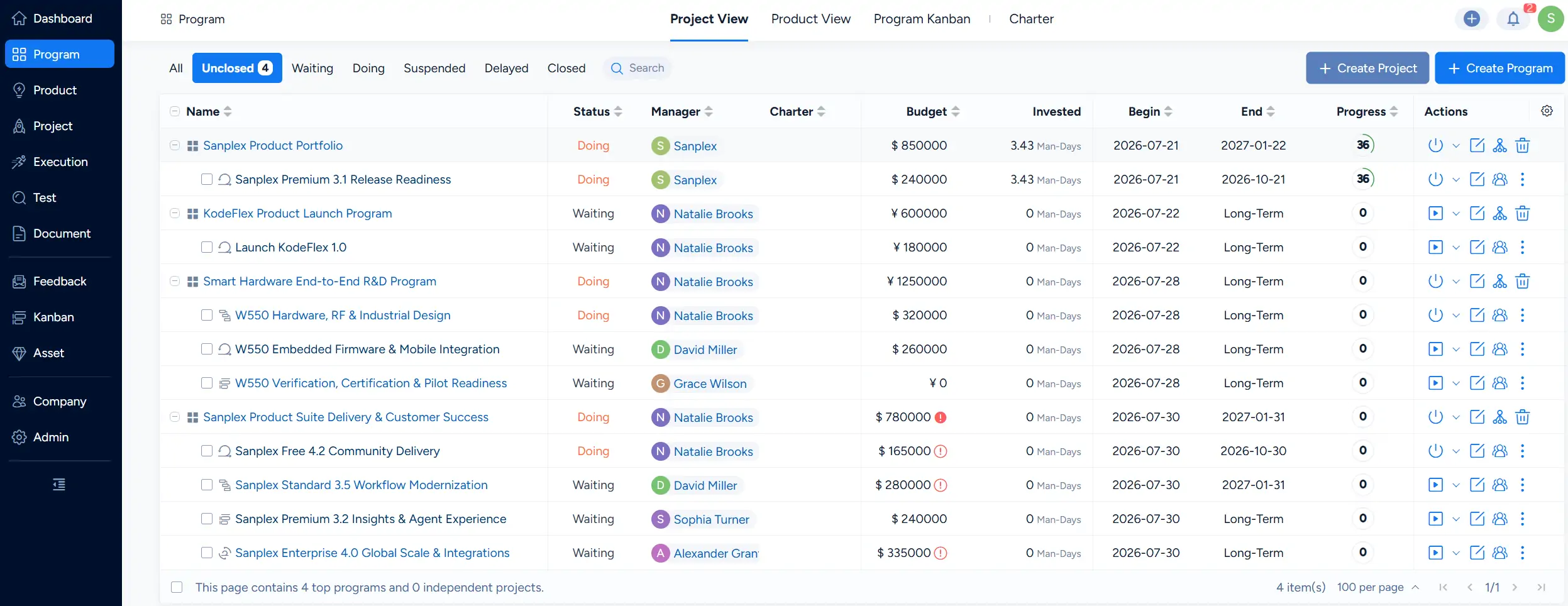
In Project View, the Program List provides a hierarchical view of Programs and their related Projects. Depending on the current Program structure and available data, the list can include:
- Entry points for creating a Program or Project.
- Top-level Programs and their related Projects.
- Hierarchical relationships between Programs, sub-programs, and Projects when multiple levels are configured.
- Independent Projects when they are available outside a Program structure.
You can also use the available status filters and search to narrow the items displayed in the list.