
Program
1. Introduction of Sanplex features
1.1. Core Management Framework
1.1.1 Program
1.1.2 Project
1.1.3 Product
1.1.4 Execution
1.1.5 Management Models
1.2. Dashboard
1.2.1 Getting Started with Tutorials
1.2.2 Quick Add
1.2.3 Notification Center
1.2.4 Effort Tracking
1.2.5 Dashboard - Project and Execution
1.2.6 Dashboard - My Work, Contribution, and Recents
1.2.7 Dashboard - Approval
1.2.8 Contacts
1.3. Program
1.3.1 Program List
1.3.2 Program Kanban
1.3.3 Create Program
1.3.4 Create Sub-Programs
1.3.5 Project Charter Management
1.4. Product
1.4.1 Create Product
1.4.2 Manage Modules
1.4.3 Multi-Branch and Multi-Platform Management
1.4.4 Manage Plans
1.4.5 Manage Requirements
1.4.6 Requirement Reviews
1.4.7 Requirement Status and Phase
1.4.8 Create Releases
1.4.9 Track Progress
1.4.10 Business Requirements and Multi-Level Requirements
1.5. Project
1.5.1 Scrum Project
1.5.2. Waterfall Project
1.5.2.1 Manage Project Phases
1.5.2.2 Project Design
1.5.2.3 Project Matrix
1.5.2.4 Project Reports and Earned Value Management
1.5.2.5 Project Baselines
1.5.2.6 Project Change
1.5.3. Kanban Project
1.5.3.1 Set Up Kanban Projects
1.5.3.2 Configure Kanban Boards
1.5.3.3 Use Kanban Boards
1.5.4 Hybrid Agile Project
1.5.5 Hybrid Waterfall Project
1.5.6. Project Settings
1.5.6.1 Project Setup
1.5.6.2 Project Executions
1.5.6.3 Project Requirements
1.5.6.4 Project Builds
1.5.6.5 Project Tests
1.6. Admin Settings
1.6.1 Confluence Data Import
1.7. Workflow

Program Kanban

2026-03-09 09:31:34
Sanplex Content
431
Last edited by Jing WANG on 2026-08-14 14:00:00
Share links
Summary: Learn how to use Program Kanban in Sanplex to visually review Programs, related Products, Plans, Projects, Executions, and Releases across different delivery statuses.

Program Kanban provides a visual overview of work across Programs. It helps users quickly review related Products and key delivery information, such as unexpired Plans, waiting Projects, ongoing Projects, ongoing Executions, and Releases.

View Programs in Program Kanban

Program Kanban provides two views: My Programs and Others.

  • My Programs shows Programs in which the current user is involved, such as as an owner, team member, or whitelist member.
  • Others provides access to other Programs that the current user has permission to view.

You can switch between these two views from the top of Program Kanban. Within each Program, related information is organized visually by Product and work status, making it easier to understand the current delivery situation across different Programs.
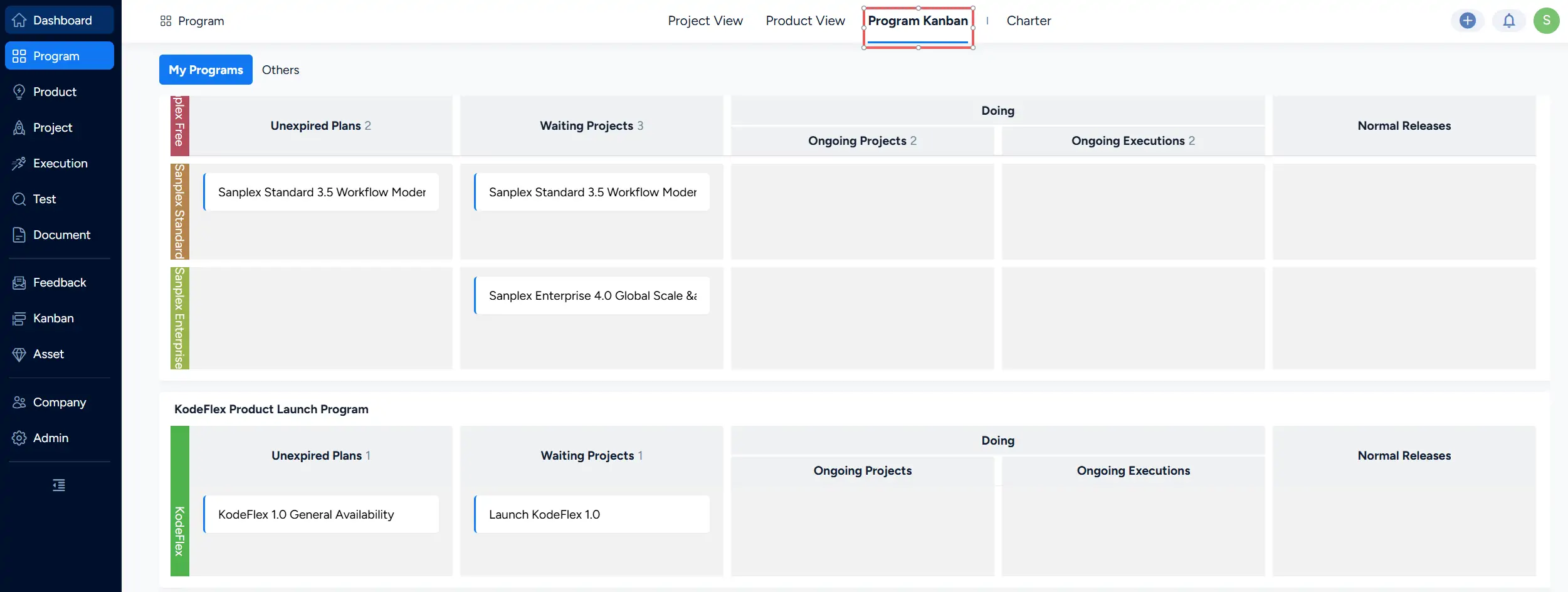
Program Kanban showing the My Programs and Others views with related Products and delivery information organized by work status.

Write a Comment
Comment will be posted after it is reviewed.
