
Feature Configuration
1. Introduction of Sanplex features
1.1. Core Management Framework
1.1.1 Program
1.1.2 Project
1.1.3 Product
1.1.4 Execution
1.1.5 Management Models
1.2. Dashboard
1.2.1 Getting Started with Tutorials
1.2.2 Quick Add
1.2.3 Notification Center
1.2.4 Effort Tracking
1.2.5 Dashboard - Project and Execution
1.2.6 Dashboard - My Work, Contribution, and Recents
1.2.7 Dashboard - Approval
1.2.8 Contacts
1.3. Program
1.3.1 Program List
1.3.2 Program Kanban
1.3.3 Create Program
1.3.4 Create Sub-Programs
1.3.5 Project Charter Management
1.4. Product
1.4.1 Create Product
1.4.2 Manage Modules
1.4.3 Multi-Branch and Multi-Platform Management
1.4.4 Manage Plans
1.4.5 Manage Requirements
1.4.6 Requirement Reviews
1.4.7 Requirement Status and Phase
1.4.8 Create Releases
1.4.9 Track Progress
1.4.10 Business Requirements and Multi-Level Requirements
1.5. Project
1.5.1 Scrum Project
1.5.2. Waterfall Project
1.5.2.1 Manage Project Phases
1.5.2.2 Project Design
1.5.2.3 Project Matrix
1.5.2.4 Project Reports and Earned Value Management
1.5.2.5 Project Baselines
1.5.2.6 Project Change
1.5.3. Kanban Project
1.5.3.1 Set Up Kanban Projects
1.5.3.2 Configure Kanban Boards
1.5.3.3 Use Kanban Boards
1.5.4 Hybrid Agile Project
1.5.5 Hybrid Waterfall Project
1.5.6. Project Settings
1.5.6.1 Project Setup
1.5.6.2 Project Executions
1.5.6.3 Project Requirements
1.5.6.4 Project Builds
1.5.6.5 Project Tests
1.5.6.6 Project Docs
1.5.6.7 Project Releases
1.5.6.8 Project Reports
1.5.6.9 Project Risks
1.5.6.10 Project Issues
1.5.6.11 Project Opportunities
1.5.6.12 Project Deliverables
1.5.6.13 Project Reviews
1.5.6.14 Project Process
1.5.6.15 Deliverables
1.5.6.16 Quality Assurance
1.5.6.17 Project-specific Workflow Management
1.5.7 Project Templates
1.6. Execution
1.6.1 Product Planning and Task Breakdown
1.6.2 Task Assignment and Daily Tracking
1.6.3 Build Creation and Test Requests
1.6.4 Bug Confirmation and Resolution
1.6.5 Execution Kanban Boards
1.7. Agent
1.7.1 Conversation
1.7.2 Sanplex Agents
1.7.3 General Agents
1.7.4 Skill Management
1.7.5 AI Knowledge Library
1.7.6 Models
1.7.7 ZAI Service Installation
1.7.8 ZAI Service Control Panel
1.7.9 ZAI Configuration
1.8. Admin Settings
1.8.1. System Settings
1.8.1.1 Mode
1.8.1.2 Backup
1.8.1.3 Trash
1.8.1.4 License
1.8.1.5 Security
1.8.1.6 Cron Job
1.8.1.7 Time Zone
1.8.1.8 Rebuild Index
1.8.1.9 LDAP
1.8.1.10 Table Engine
1.8.2 Feature Options
1.8.3. Users Management
1.8.3.1 Set Departments and Edit Company Profile
1.8.3.2 Manage Users
1.8.3.3 Set Permisions
1.8.4. Feature Configuration
1.8.4.1 Dashboard
1.8.4.2 Product
1.8.4.3 Project
1.8.4.4 Execution
1.8.4.5 Test
1.8.4.6 Kanban
1.8.4.7 Feedback
1.8.4.8 Tickets
1.8.4.9 User
1.8.4.10 Relations (Standard Version)
1.8.4.11 Meaturement
1.8.5. Agent Configuration
1.9. Asset Library (Premium)
1.9.1 Asset Library Management (Premium)

Feedback

2026-09-30 11:27:23
Sanplex Content
196
Last edited by Kelsea Zhang on 2026-09-30 14:00:51
Share links
Summary: This guide explains the customizable modules and fields of the Feedback feature in Sanplex, covering required fields, the review process, closure reasons, feedback types, and priorities.

Go to Admin > Features > Feedback to configure the various elements of feedback.

I. Feedback – Required Field

Under Feedback > Feedback > Required Field, you can set which fields are mandatory when a feedback is created or edited.
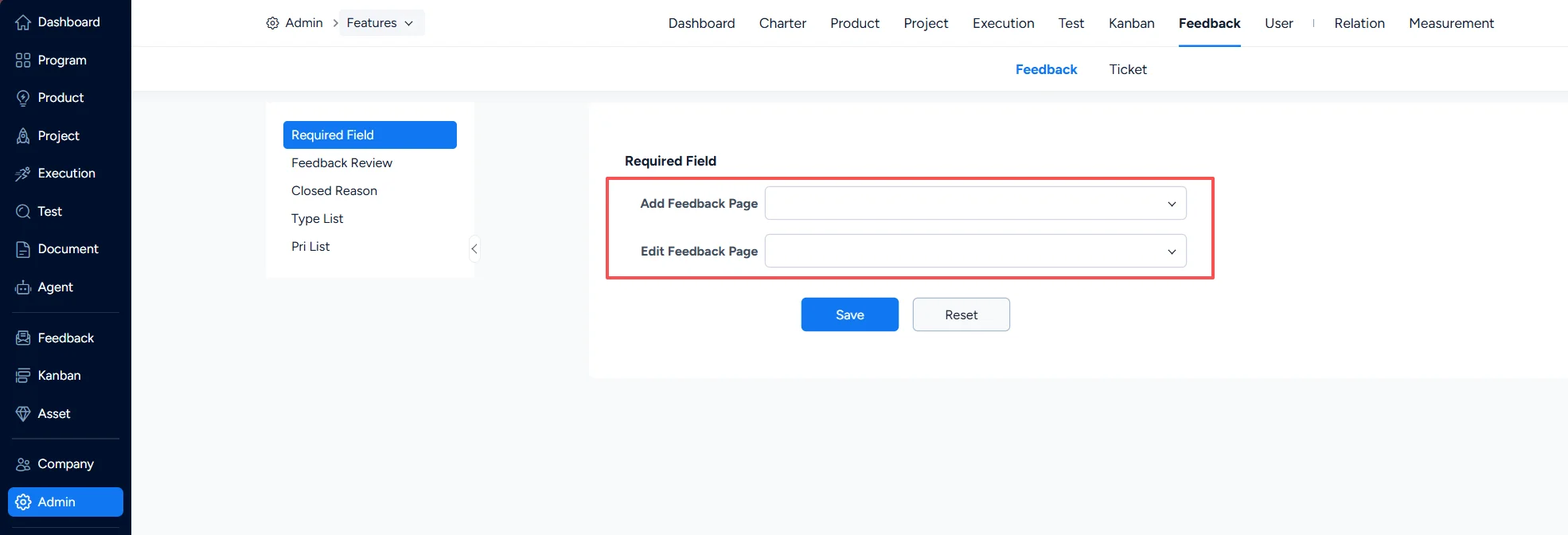
Set mandatory fileds for feedback

II. Feedback – Review Process

Under Feedback > Feedback > Feedback Review, you can configure whether the review process is enabled for feedback.

If a mandatory reviewer is designated, feedback submitted by that reviewer must go through the review process, whether or not the review process is enabled.

For Reviewers, you can designate a review role or individual reviewers.
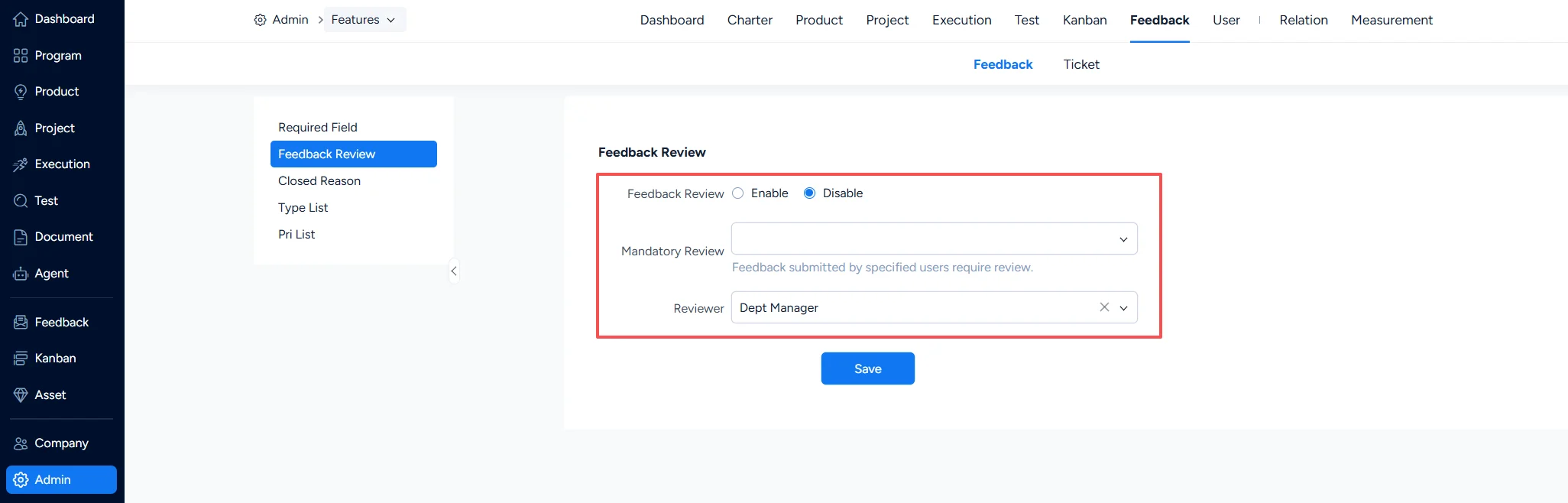
Feedback review

III. Feedback – Closure Reasons

Under Feedback > Feedback > Closed Reason, you can configure the closure reasons for feedback.
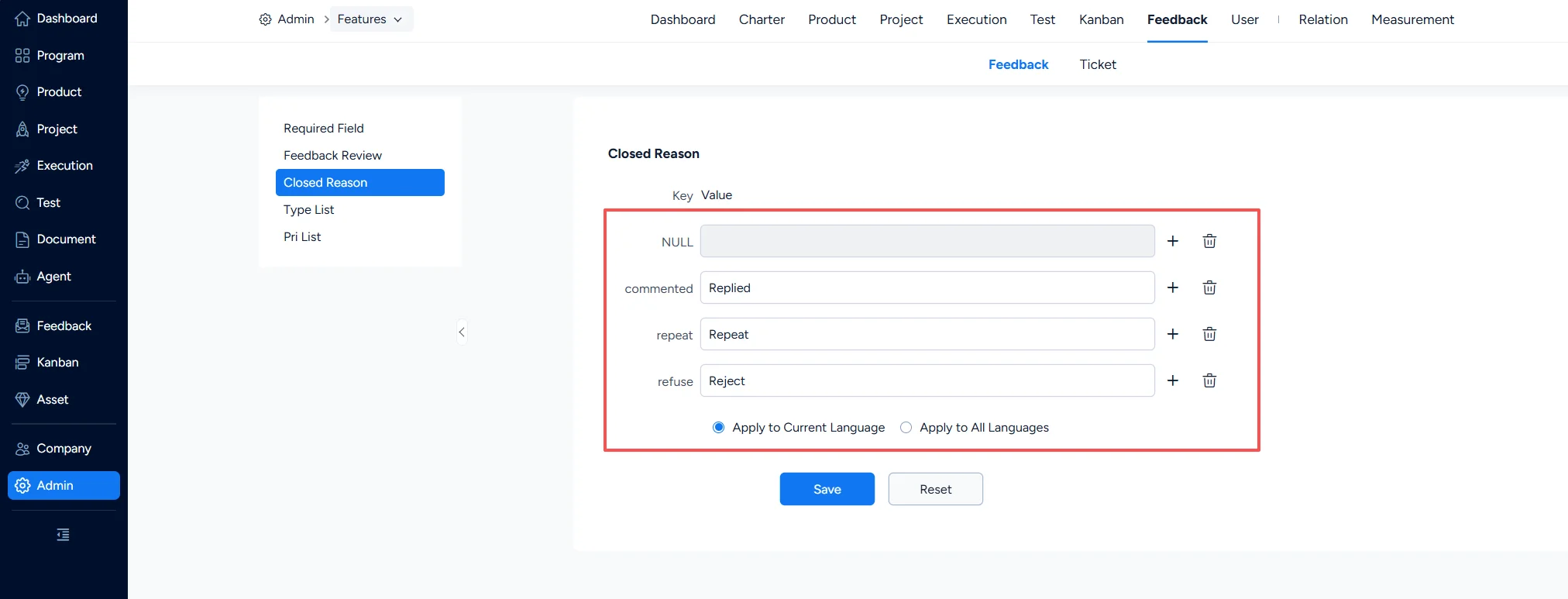
Set feedback closure reasons

IV. Feedback – Feedback Types

Under Feedback > Feedback > Type List, you can configure feedback types.
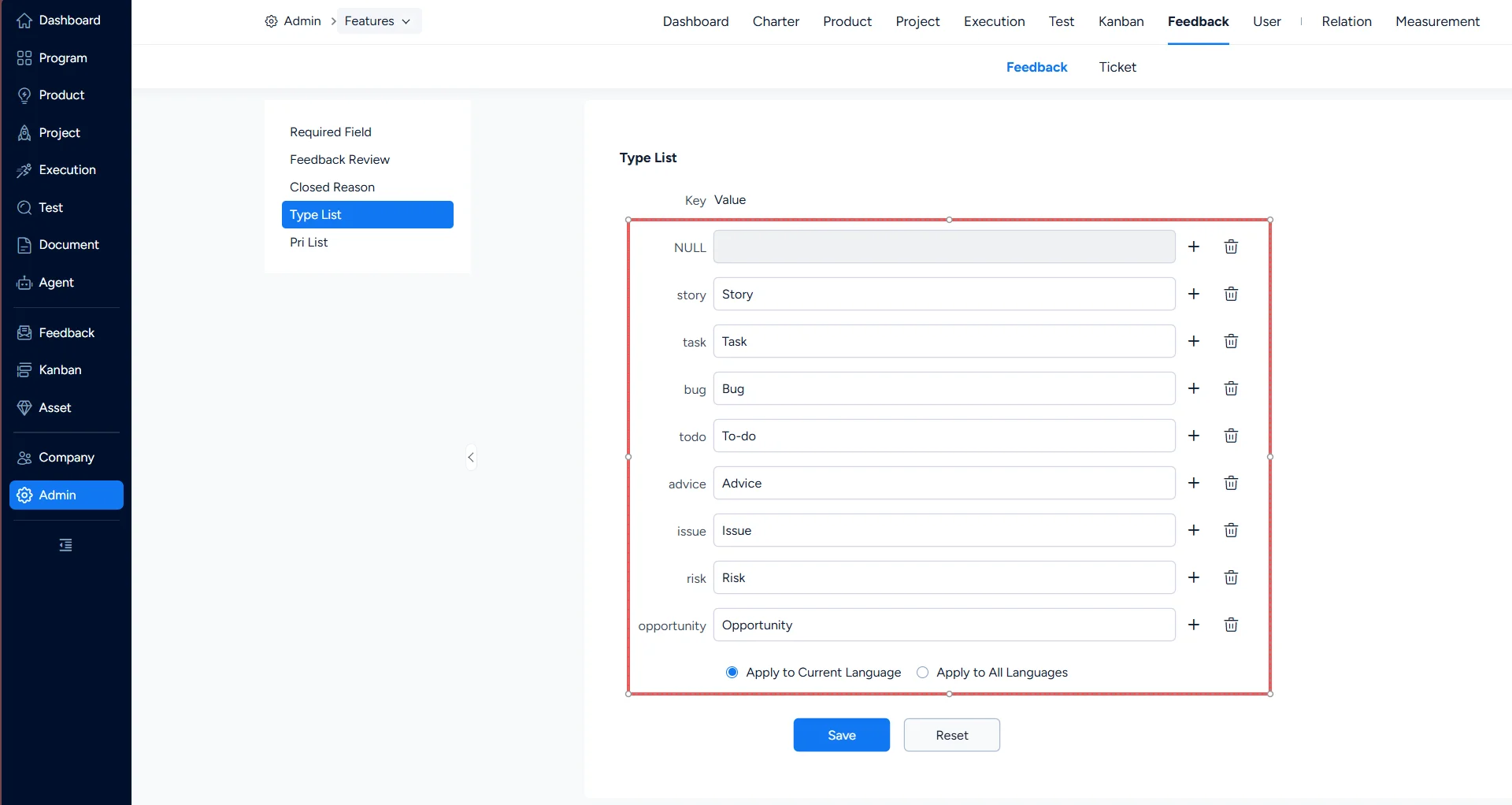
Set feedback types

V. Feedback – Priority

Under Feedback > Feedback > Pri List, you can configure feedback priorities.
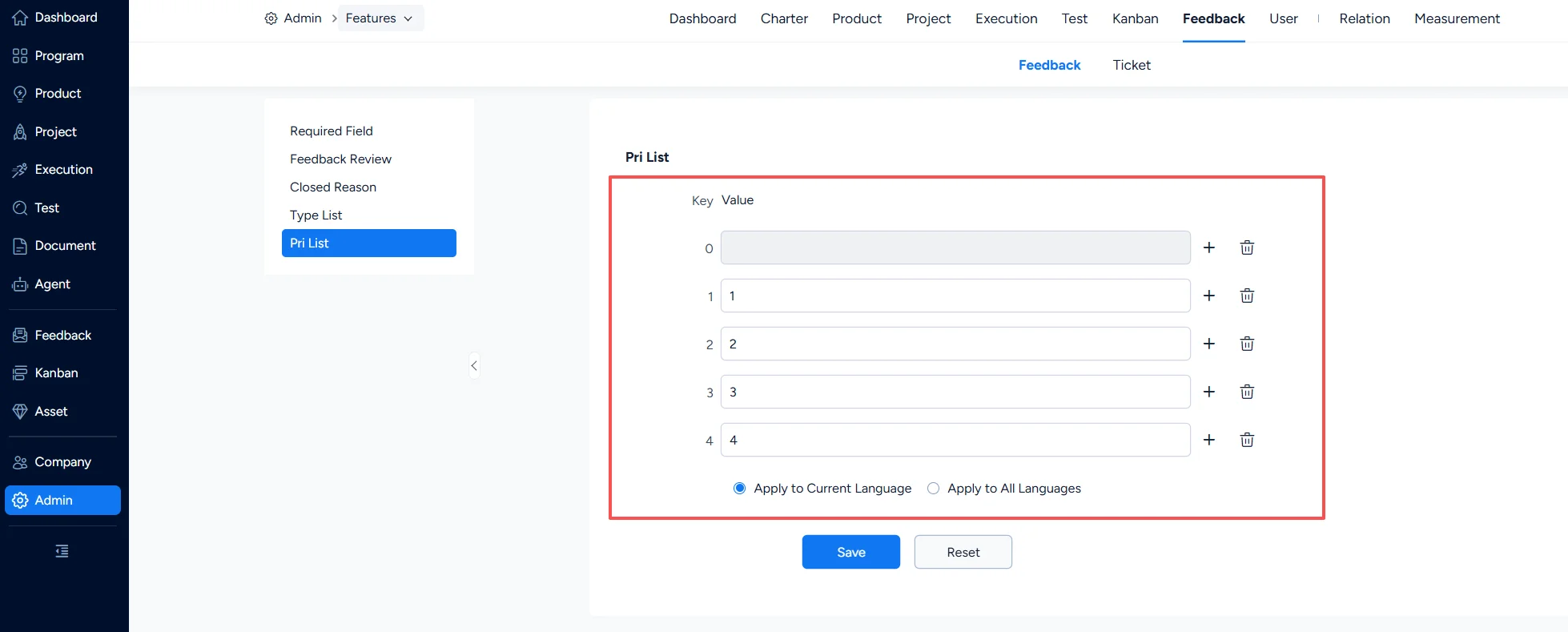
Set feedback priorities

Write a Comment
Comment will be posted after it is reviewed.
