
Program
1. Introduction of Sanplex features
1.1. Core Management Framework
1.1.1 Program
1.1.2 Project
1.1.3 Product
1.1.4 Execution
1.1.5 Management Models
1.2. Dashboard
1.2.1 Getting Started with Tutorials
1.2.2 Quick Add
1.2.3 Notification Center
1.2.4 Effort Tracking
1.2.5 Dashboard - Project and Execution
1.2.6 Dashboard - My Work, Contribution, and Recents
1.2.7 Dashboard - Approval
1.2.8 Contacts
1.3. Program
1.3.1 Program List
1.3.2 Program Kanban
1.3.3 Create Program
1.3.4 Create Sub-Programs
1.3.5 Project Charter Management
1.4. Product
1.4.1 Create Product
1.4.2 Manage Modules
1.4.3 Multi-Branch and Multi-Platform Management
1.4.4 Manage Plans
1.4.5 Manage Requirements
1.4.6 Requirement Reviews
1.4.7 Requirement Status and Phase
1.4.8 Create Releases
1.4.9 Track Progress
1.4.10 Business Requirements and Multi-Level Requirements
1.5. Project
1.5.1 Scrum Project
1.5.2. Waterfall Project
1.5.2.1 Manage Project Phases
1.5.2.2 Project Design
1.5.2.3 Project Matrix
1.5.2.4 Project Reports and Earned Value Management
1.5.2.5 Project Baselines
1.5.2.6 Project Change
1.5.3. Kanban Project
1.5.3.1 Set Up Kanban Projects
1.5.3.2 Configure Kanban Boards
1.5.3.3 Use Kanban Boards
1.5.4 Hybrid Agile Project
1.5.5 Hybrid Waterfall Project
1.5.6. Project Settings
1.5.6.1 Project Setup
1.5.6.2 Project Executions
1.5.6.3 Project Requirements
1.5.6.4 Project Builds
1.5.6.5 Project Tests
1.6. Admin Settings
1.6.1 Confluence Data Import
1.7. Workflow

Create Sub-Programs

2026-03-09 09:55:35
Sanplex Content
193
Last edited by Jing WANG on 2026-08-14 14:18:24
Share links
Summary: Learn how to create sub-programs in Sanplex either directly from the Program List or by selecting a Parent Program when creating a new Program.

Sanplex supports multi-level Program structures by allowing you to create sub-programs under an existing Program. You can create a sub-program directly from the Program List or select a parent when creating a new Program.

1. Create a Sub-Program from the Program List

In Project View, locate the parent Program in the Program List and use the sub-program action in the Actions area to create a Program under it.

Program Project View showing the action used to create a sub-program under an existing Program.

2. Select a Parent Program When Creating a Program

You can also click Create Program and select the appropriate Program from the Parent Program field.

Selecting a parent places the new Program under that Program in the hierarchy. To create a top-level Program, leave the Parent Program at the top level.
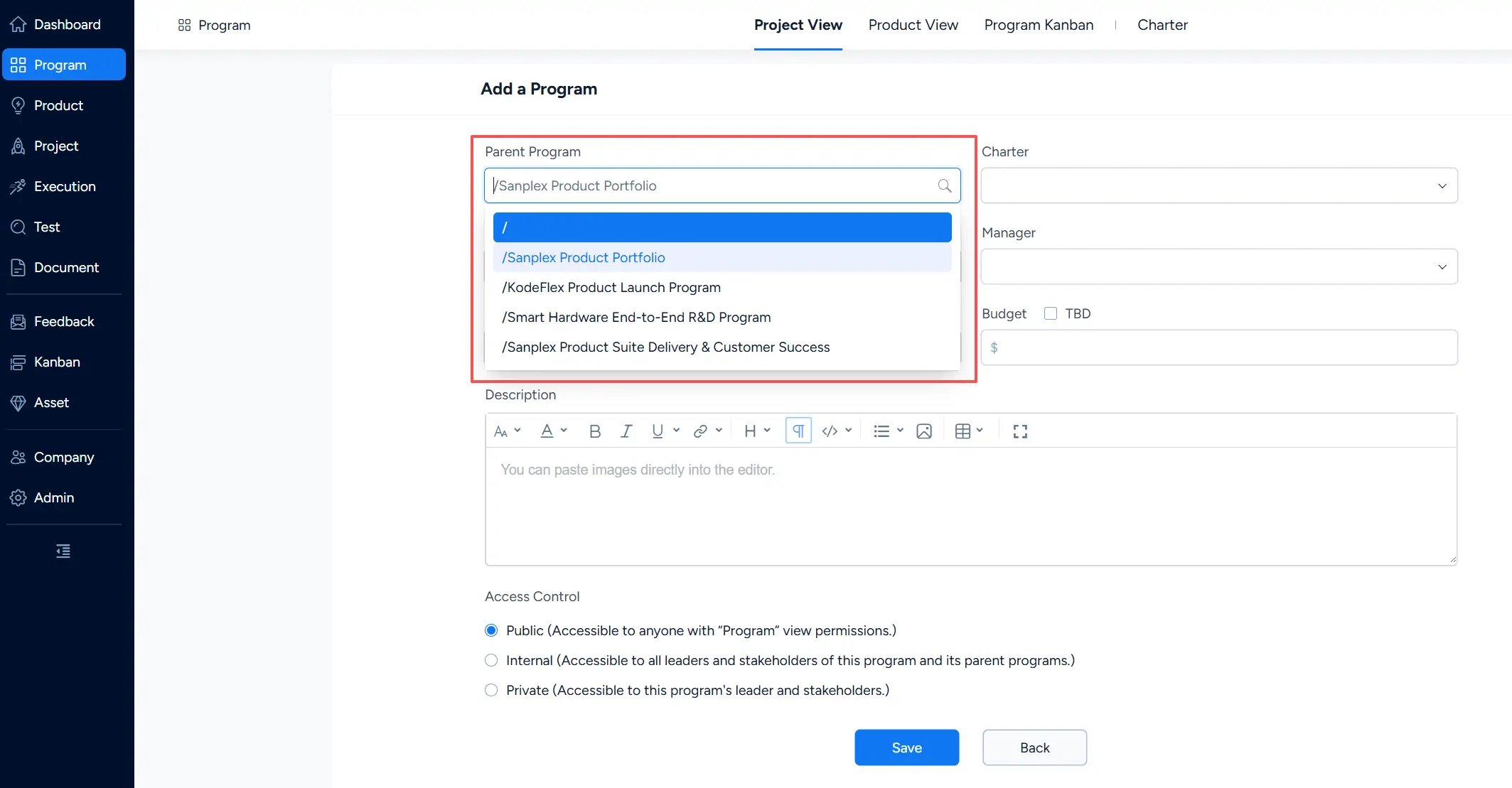
Add a Program form showing the Parent Program field with available Programs for creating a hierarchical Program structure.

Write a Comment
Comment will be posted after it is reviewed.
