Catalog
The Approval view on the Dashboard brings together items that require the current user's review or approval. Depending on the enabled modules, configured workflows, and user permissions, different types of approval items may appear in this view.
The Approval list helps users quickly identify pending reviews and process them without unnecessarily delaying the related workflow.
The example below uses Stories to illustrate how the approval process works.
1. View Pending Approvals
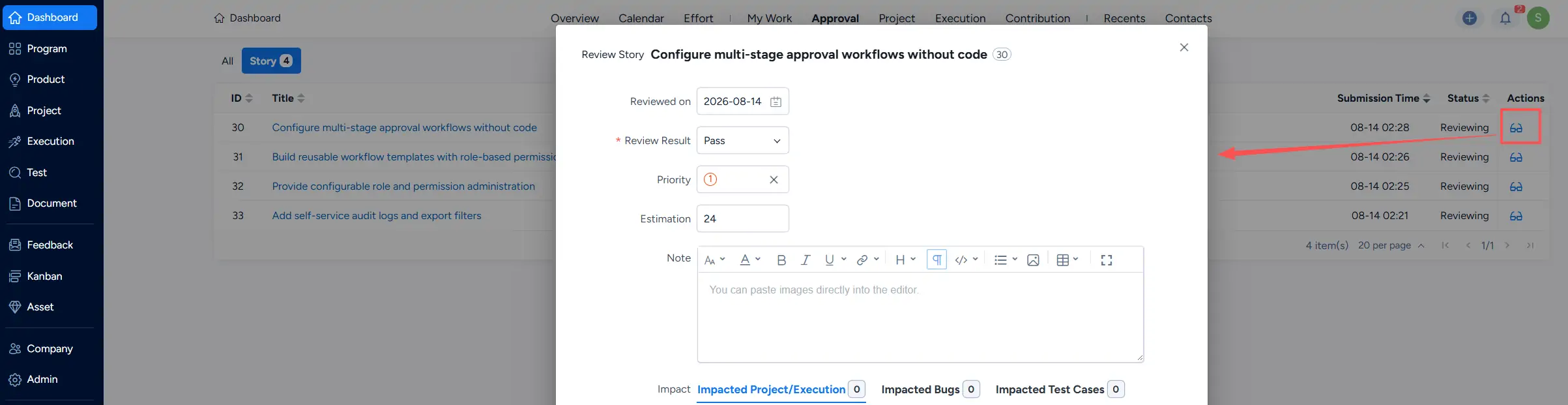
Go to Dashboard → Approval to view items waiting for your review. You can use the available object-type tabs, such as Story, to switch between different approval lists.
The list provides key information about each pending item, including its title, type, related Product or Project, submission time, status, and available actions.

2. Review a Pending Story
In the Actions column, click the available Review action for the Story you want to process.

Complete the review form by entering the required review information, then submit the review. Once the review is completed, the item is updated according to the configured workflow and no longer remains in the current pending approval list when no further action is required from you.