
Project Settings
1. Introduction of Sanplex features
1.1. Core Management Framework
1.1.1 Program
1.1.2 Project
1.1.3 Product
1.1.4 Execution
1.1.5 Management Models
1.2. Dashboard
1.2.1 Getting Started with Tutorials
1.2.2 Quick Add
1.2.3 Notification Center
1.2.4 Effort Tracking
1.2.5 Dashboard - Project and Execution
1.2.6 Dashboard - My Work, Contribution, and Recents
1.2.7 Dashboard - Approval
1.2.8 Contacts
1.3. Program
1.3.1 Program List
1.3.2 Program Kanban
1.3.3 Create Program
1.3.4 Create Sub-Programs
1.3.5 Project Charter Management
1.4. Product
1.4.1 Create Product
1.4.2 Manage Modules
1.4.3 Multi-Branch and Multi-Platform Management
1.4.4 Manage Plans
1.4.5 Manage Requirements
1.4.6 Requirement Reviews
1.4.7 Requirement Status and Phase
1.4.8 Create Releases
1.4.9 Track Progress
1.4.10 Business Requirements and Multi-Level Requirements
1.5. Project
1.5.1 Scrum Project
1.5.2. Waterfall Project
1.5.2.1 Manage Project Phases
1.5.2.2 Project Design
1.5.2.3 Project Matrix
1.5.2.4 Project Reports and Earned Value Management
1.5.2.5 Project Baselines
1.5.2.6 Project Change
1.5.3. Kanban Project
1.5.3.1 Set Up Kanban Projects
1.5.3.2 Configure Kanban Boards
1.5.3.3 Use Kanban Boards
1.5.4 Hybrid Agile Project
1.5.5 Hybrid Waterfall Project
1.5.6. Project Settings
1.5.6.1 Project Setup
1.5.6.2 Project Executions
1.5.6.3 Project Requirements
1.5.6.4 Project Builds
1.5.6.5 Project Tests
1.5.6.6 Project Docs
1.5.6.7 Project Releases
1.5.6.8 Project Reports
1.5.6.9 Project Risks
1.5.6.10 Project Issues
1.5.6.11 Project Opportunities
1.5.6.12 Project Deliverables
1.5.6.13 Project Reviews
1.5.6.14 Project Process
1.5.6.15 Deliverables
1.6. Admin Settings
1.7. Workflow

Deliverables

2026-03-29 18:01:30
Sanplex Content
128
Last edited by Jing WANG on 2026-09-13 00:06:16
Share links
Summary: Learn how to submit, view, edit, update versions of, and delete project deliverables while maintaining traceable deliverable information.

Feature Overview

Deliverables are a core part of project execution. This feature helps teams track, review, version, and manage key project outputs throughout the delivery lifecycle.

Project managers can manage deliverables across major stages such as requirements, design, development, testing, and release, making sure each output meets quality expectations and delivery timelines.

The feature also supports version management. Deliverable versions and review information are recorded in Sanplex, making it easier to trace updates and maintain the history of project outputs.

Use Cases

1. Control stage-based project outputs

At key stages such as requirements, design, development, testing, and release, project managers can manage deliverables against a defined deliverable list, including submission source, submitter, submission time, and delivery status. This helps ensure that outputs are complete, traceable, and delivered on time.

2. Review deliverable quality

After a deliverable is submitted, teams can review it and track the review status. Review information is retained with the deliverable to support consistent quality control and process governance.

3. Manage versions and trace changes

Deliverables can be maintained through versions, with version information and update history recorded on the deliverable details page. This helps teams trace changes and maintain clear version history.

I. Submit a Deliverable

In the deliverable list, click Submit in the upper-right corner.

Deliverable page showing the Submitted tab, deliverable categories on the left, submitted deliverables in the list, and the Submit button in the upper-right corner.

The Submit Deliverable dialog displays the corresponding Deliverable Type and Activity. Select an existing document that you can view, or click Create Document to create a document for submission. The When field shows the configured submission timing for the selected deliverable type.

Click Save to submit the deliverable.
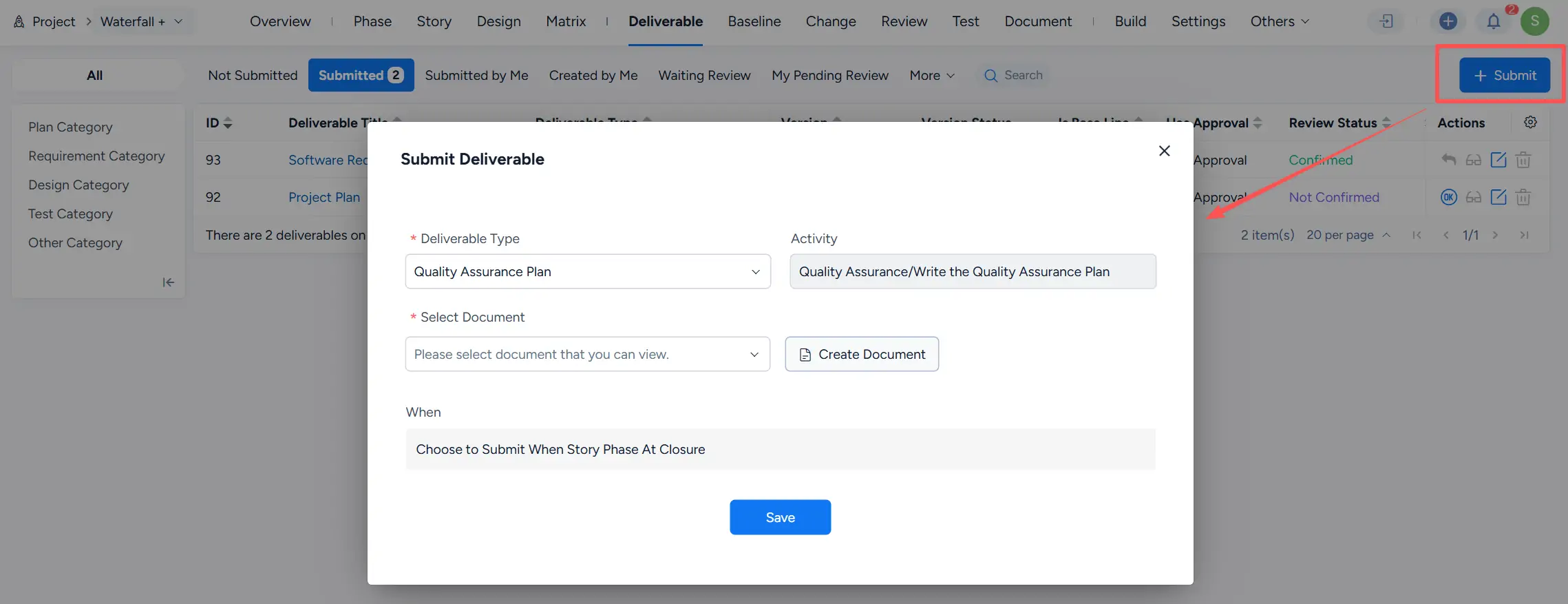
Submit Deliverable dialog showing Deliverable Type, Activity, Select Document, Create Document, When, and Save.

Submitted deliverables are displayed under the Submitted tab.

Submitted deliverable list showing Software Requirements Specification and Project Plan, together with their deliverable types and review statuses.

II. View Deliverable Details

In the deliverable list, click a deliverable title to open its details page.

The details page displays the deliverable content, Basic Information, and History. The current version is shown next to the deliverable title.

If a deliverable contains multiple versions, click the version drop-down next to the title to switch between available versions.
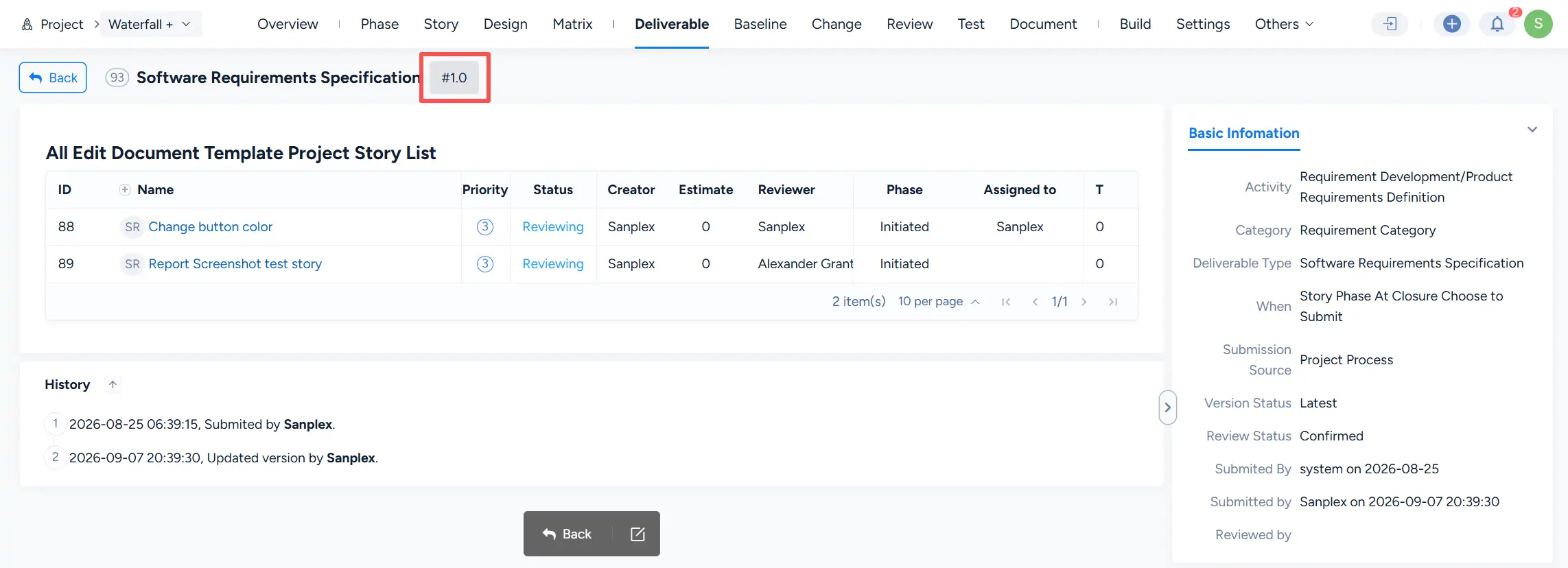
Software Requirements Specification deliverable details page showing version #1.0, deliverable content, Basic Information, and submission and version update history.

III. Edit and Update a Deliverable

Click Edit in the Actions column to open the editing page for the object associated with the deliverable.

Submitted deliverable list showing the Edit actions for Software Requirements Specification and Project Plan.

After changes are made to the associated object, check the deliverable's Review Status in the deliverable list.

For a deliverable with the Not Confirmed review status, click Update Version in the Actions column to update the deliverable version.

Submitted deliverable list showing a deliverable with Not Confirmed review status and the Update Version action in the Actions column.

IV. Delete a Deliverable

Click Delete in the Actions column to remove an eligible deliverable.

Sanplex displays a confirmation dialog before deletion. Deleting the deliverable does not delete the original document.
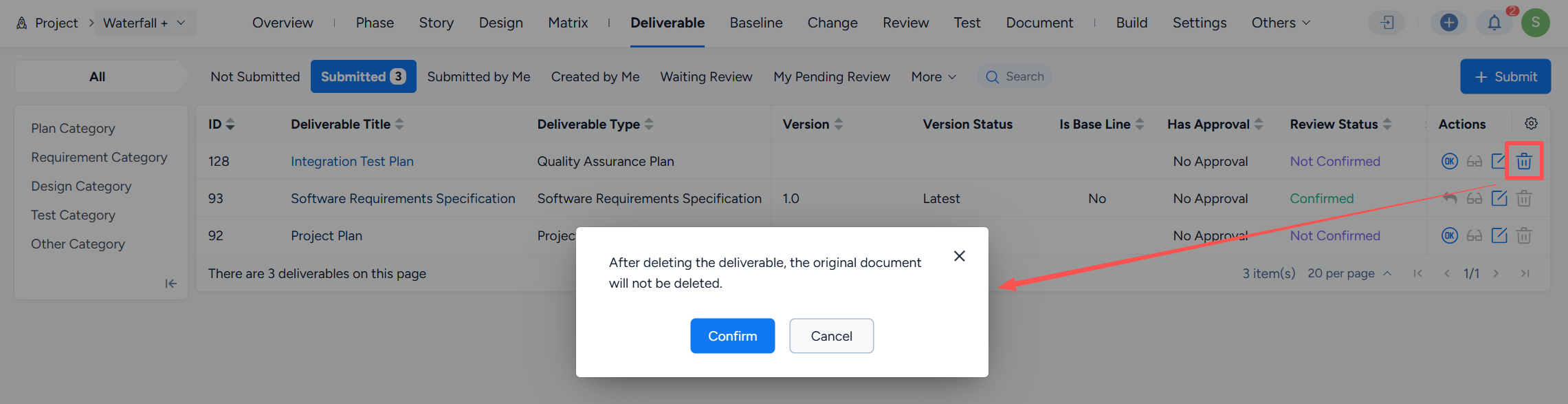
Deliverable deletion confirmation dialog stating that the original document will not be deleted, with Confirm and Cancel buttons.

Write a Comment
Comment will be posted after it is reviewed.
