
Flow Settings
1. Using Sanplex by Role
1.1. Administrator
1.1.1 Manage Departments
2. Introduction of Sanplex features
2.1. Core Management Framework
2.1.1 Program
2.1.2 Project
2.1.3 Product
2.1.4 Execution
2.1.5 Management Models
2.2. Dashboard
2.2.1 Getting Started with Tutorials
2.2.2 Quick Add
2.2.3 Notification Center
2.2.4 Effort Tracking
2.2.5 Dashboard - Project and Execution
2.2.6 Dashboard - My Work, Contribution, and Recents
2.2.7 Dashboard - Approval
2.2.8 Contacts
2.3. Program
2.3.1 Program List
2.3.2 Program Kanban
2.3.3 Create Program
2.3.4 Create Sub-Programs
2.3.5 Project Charter Management
2.4. Product
2.4.1 Create Product
2.4.2 Manage Modules
2.4.3 Multi-Branch and Multi-Platform Management
2.4.4 Manage Plans
2.4.5 Manage Stories
2.4.6 Story Reviews
2.4.7 Story Status and Phase
2.4.8 Create Releases
2.4.9 Track Progress
2.4.10 Epics and Multi-Level Stories
2.5. Project
2.5.1 Scrum Project
2.5.2. Waterfall Project
2.5.2.1 Manage Project Phases
2.5.2.2 Project Design
2.5.2.3 Project Matrix
2.5.2.4 Project Reports and Earned Value Management
2.5.2.5 Project Baselines
2.5.2.6 Project Change
2.5.3. Kanban Project
2.5.3.1 Set Up Kanban Projects
2.5.3.2 Configure Kanban Boards
2.5.3.3 Use Kanban Boards
2.5.4 Hybrid Agile Project
2.5.5 Hybrid Waterfall Project
2.5.6. Project Settings
2.5.6.1 Project Setup
2.5.6.2 Project Executions
2.5.6.3 Project Requirements
2.5.6.4 Project Builds
2.5.6.5 Project Tests
2.5.6.6 Project Docs
2.5.6.7 Project Releases
2.5.6.8 Project Reports
2.5.6.9 Project Risks
2.5.6.10 Project Issues
2.5.6.11 Project Opportunities
2.5.6.12 Project Deliverables
2.5.6.13 Project Reviews
2.5.6.14 Project Process
2.5.6.15 Deliverables
2.5.6.16 Quality Assurance
2.5.6.17 Project-specific Workflow Management
2.5.7 Project Templates
2.6. Execution
2.6.1 Product Planning and Task Breakdown
2.6.2 Task Assignment and Daily Tracking
2.6.3 Build Creation and Test Requests
2.6.4 Bug Confirmation and Resolution
2.6.5 Execution Kanban Boards
2.7. Testing
2.7.1 Write Test Cases
2.7.2 Execute Test Cases
2.7.3 Bug Submission and Reports
2.7.4 Verify and Close Bugs
2.7.5 Test Case Scenes
2.7.6 Submit a Test Request
2.7.7 Test Report
2.8. Agent
2.8.1 Conversation
2.8.2 Sanplex Agents
2.8.3 General Agents
2.8.4 Skill Management
2.8.5 AI Knowledge Library
2.8.6 Models
2.8.7 ZAI Service Installation
2.8.8 ZAI Service Control Panel
2.8.9 ZAI Configuration
2.9. Kanban
2.9.1 Kanban Spaces
2.9.2 Kanban Regions
2.9.3 Kanban Cards
2.10. Company
2.10.1 View Team Members and Work Information
2.10.2 View Recent Company Activity
2.10.3 View and Edit Company Information
2.11. Feedback
2.11.1 Configure, Create, and Review Feedback
2.11.2 Process Feedback and Send Notifications
2.11.3 Tickets
2.12. Admin Settings
2.12.1. System Settings
2.12.1.1 Mode
2.12.1.2 Backup
2.12.1.3 Trash
2.12.1.4 License
2.12.1.5 Security
2.12.1.6 Cron Job
2.12.1.7 Time Zone
2.12.1.8 Rebuild Index
2.12.1.9 LDAP
2.12.1.10 Table Engine
2.12.2 Feature Options
2.12.3. Users Management
2.12.3.1 Set Departments and Edit Company Profile
2.12.3.2 Manage Users
2.12.3.3 Set Permisions
2.12.4. Feature Configuration
2.12.4.1 Dashboard
2.12.4.2 Product
2.12.4.3 Project
2.12.4.4 Execution
2.12.4.5 Test
2.12.4.6 Kanban
2.12.4.7 Feedback
2.12.4.8 Tickets
2.12.4.9 User
2.12.4.10 Relations (Standard Version)
2.12.4.11 Meaturement
2.12.5 Migrate Jira Data to Sanplex
2.12.6 Jira to Sanplex Migration Mapping
2.12.7 Migrate Confluence Data to Sanplex
2.12.8. Agent Configuration
2.13. Asset Library (Premium)
2.13.1 Asset Library Management (Premium)

Product Flow

2026-10-14 16:01:57
Kelsea Zhang
5
Last edited by Kelsea Zhang on 2026-10-15 13:25:40
Share links
Summary: This guide introduces Product Flow in Sanplex, covering what Product Flow is used for, how software and hardware projects can follow different flows, and how to maintain the workflows inside a flow.

Overview

Product Flow lets teams define a standardized framework for product development flows and project execution flows based on their own business characteristics. With built-in or custom flows, a team can quickly create products or projects that match the way it works, which makes differentiated process management possible. This not only improves the efficiency of process management, but also keeps team collaboration standardized and consistent.

Use Cases

Differentiated process management for software vs. hardware projects: In many companies, the workflows of software and hardware products are very different. For example, a hardware product flow can add a Prototype Build stage, while a software product flow does not need it.

Different requirement form fields by product type: When managing requirements for different product types, companies often need to fill in different form fields. For example, a company with two product types (consumer products and industrial products) may require a UX Rating for its consumer products, while its industrial products focus on Technical Specification Notes.

Notes

1. In each product flow, all workflows that belong to Product and are enabled under Admin > Workflow are displayed. See Workflow for details.

2. In each flow, these workflows can be maintained independently without affecting other product flows. Custom, Design, Enable and Disable are supported.

2.1 Custom and Design:

2.1.1 Only after a workflow (for example, the Plan flow) has been set to Custom in a product flow can you enter Design to modify its fields, actions, tabs, and other configuration. Changes made to a custom workflow do not affect common workflows or the workflows of other product flows, and they apply only to the current flow. See Workflow for details.

2.1.2 A workflow that is not set to Custom follows the configuration under Admin > Workflow.

2.2 Enable and Disable:

2.2.1 Each workflow can be Enabled or Disabled, and this also applies only to the current flow.

3. Product Flow includes a built-in flow, Default Flow, which is ready to use.

3.1 To keep data accurate, you can only enable or disable the workflows that you have added yourself, and no other content can be edited. You can create a new flow to make more custom settings.

I. Product Flow

1. Product Flow contains the flows of product-related objects: Product, Epic, Feature, Story, Release, Plan, Ticket, Feedback, Test Request, Test Case, Bug, and the workflows that belong to Product.

2. Product Flow contains one built-in flow, Default Flow, which includes all product-related flows.
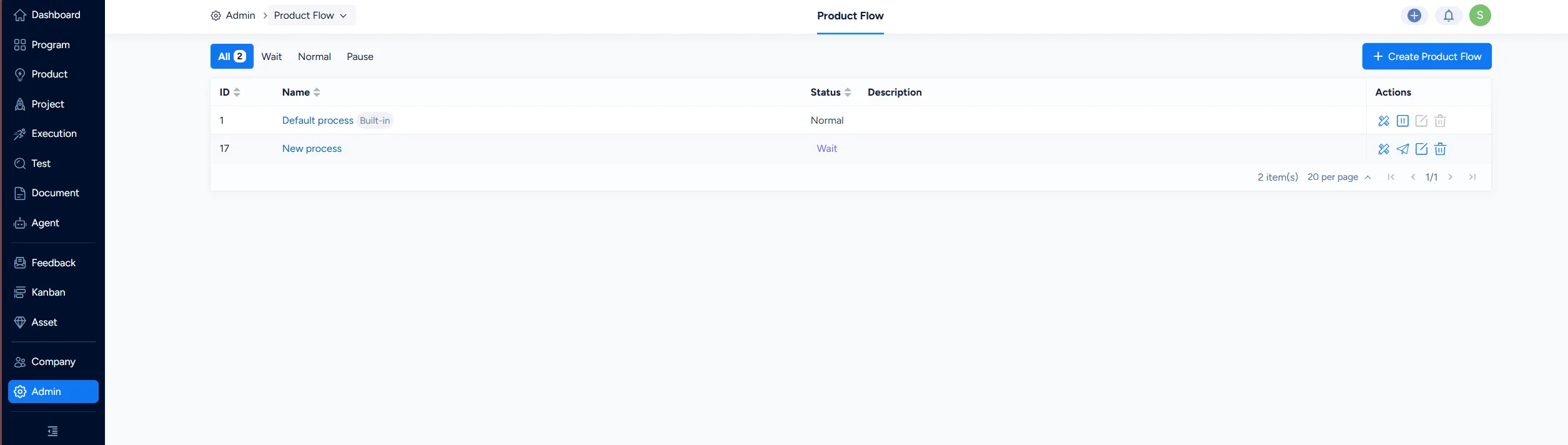
Product flow

Write a Comment
Comment will be posted after it is reviewed.
